
Manage Contractor Access for Repairs: A Step-by-Step Guide

Table of Contents
Why Managing Contractor Access Matters
Setting Up a Property Maintenance Work Order Process
Creating a work order template
Assigning and tracking work orders
Using a Tenant Repair Appointment Text Template
Key information to include
Timing and follow-up messages
Contractor Key Management for Rental Properties
Secure key handover protocols
Access codes and digital locks
Implementing Maintenance Job Tracking Software
Creating a Contractor Access Checklist
Handling Access Issues and Unavailable Residents
Frequently Asked Questions
Last Updated: 12 October 2026
Manage Contractor Access for Repairs: A Step-by-Step Guide
Managing contractor access is one of the most overlooked parts of running a rental property or managing a residential portfolio. Get it wrong, and you waste time chasing contractors, miss appointment windows, frustrate tenants, and create compliance gaps. Get it right, and your maintenance runs smoothly, residents stay informed, and your contractors know exactly what to do and when.
At Prolink Property Support, we help property managers and landlords simplify the entire process, from scheduling through to completion. This guide walks you through the practical steps to manage contractor access for repairs.
Why Managing Contractor Access Matters
Poor contractor access management creates a domino effect of problems. Contractors arrive to find residents aren't home. Tenants miss appointments because they weren't given clear notice. Keys go missing. Work doesn't get signed off. Invoices arrive weeks late with incomplete details.
The real cost isn't just the wasted hour or two, it's the friction it creates across your entire operation. Every missed appointment or unclear handover becomes a phone call you have to make. Every unclear work order becomes a dispute about scope and pricing. Every lost key becomes a security risk and a replacement cost.
Effective contractor access management solves this by creating a single, clear process that every party follows. Residents know when to expect someone. Contractors know what they're fixing and how to access the property. You have a record of who was where and when. Compliance tracking becomes automatic rather than scrambled.
Setting Up a Property Maintenance Work Order Process
A property maintenance work order process is the backbone of contractor access management. It captures the repair request, assigns it to a contractor, schedules the visit, and tracks completion. Without it, you're managing repairs by email and phone calls.
Creating a work order template
Your work order template should capture five core pieces of information:
Property details: address, tenant name, contact number
Repair description: what's broken, where it is, any safety issues
Contractor assigned: name, phone, specialist type (plumber, electrician, etc.)
Access instructions: how to get in, where keys are, any entry codes or gate passes
Completion requirements: sign-off process, photographs needed, invoice details
A simple template in a spreadsheet or property management system works fine to start. The key is consistency, every work order should follow the same format so nothing gets missed.
When you create a work order, include the date and time the contractor should arrive. Add a 30-minute window to allow for travel. Note whether the resident needs to be home or if the contractor has independent access. If keys are being handed over, document the handover method and who holds them.
Pro Tip Always include a "notes" field on your work order. Contractors often spot additional issues during the visit, a leaking tap, loose floorboard, or damaged seal. Capturing these notes means you can batch repairs and reduce future callouts.
Assigning and tracking work orders
Once a work order is created, assign it to your contractor immediately. Don't wait until the day before, give them at least three working days' notice so they can plan their schedule around it.
Use a simple status tracker: Not assigned → Assigned → Scheduled → In progress → Completed → Invoiced. Update the status each time something changes. This takes 30 seconds per update but gives you complete visibility over every repair in your portfolio.
Track which contractor is assigned to each job. Over time, you'll see which contractors respond quickly, complete work on time, and produce clean invoices. This data helps you make better contractor choices and negotiate better terms.
Using a Tenant Repair Appointment Text Template
Most tenants today prefer a text message or email notification over a phone call. A tenant repair appointment text template ensures they get the right information in a clear, scannable format.
Key information to include
Your template should cover:
Who's coming: contractor name and trade (e.g., "John from ABC Plumbing")
When: exact date and time window (e.g., "Tuesday 14 October, 9am-10am")
What they're fixing: brief description (e.g., "Fixing leaking kitchen tap")
What tenant needs to do: "Please be home" or "No access needed, contractor has keys"
Contact number: in case tenant needs to reschedule
Confirmation request: ask them to reply confirming they'll be there
Keep it short. Tenants don't read long messages. Three or four sentences is ideal. Use plain language, avoid jargon about work order numbers or job codes.
Timing and follow-up messages
Send the first message at least five working days before the appointment. This gives tenants time to plan around it and reschedule if needed.
Send a reminder message 24 hours before. This catches tenants who missed the first message and reduces no-shows.
If the tenant doesn't confirm, send a follow-up call or message the day before. A no-show wastes the contractor's time and costs you money in failed visits.
After the work is done, send a brief thank-you message and ask the tenant to confirm the repair was completed satisfactorily. This gives you a record and catches any issues the contractor missed.
Contractor Key Management for Rental Properties
Contractor key management is where many property managers create security and compliance problems. Keys get lost, duplicated, or held onto after the job is done. Access codes are shared widely and never changed.
Secure key handover protocols
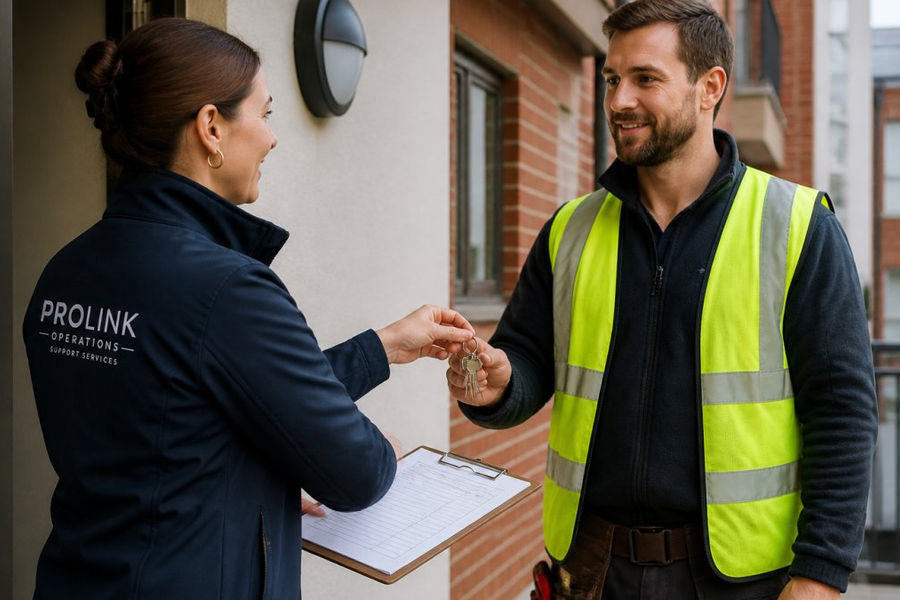
Create a simple key handover protocol. When a contractor needs access, you hand over the key in person or via a secure drop-off point. The contractor signs a receipt confirming they have it. They return it immediately after the work, ideally the same day.
Document the handover in writing. Note the date, time, contractor name, and property address. This creates an audit trail. If a key goes missing, you know exactly when and to whom it was given.
For properties with multiple contractors visiting regularly, consider a key box at the property. Leave the key in a secure lockbox with a combination code. The contractor enters the code, takes the key, completes the work, and returns it. You change the code between contractors. This removes the need for you to be present for every handover.
Access codes and digital locks
Digital locks and smart access codes are increasingly common in rental properties. They're more secure than physical keys and create an automatic audit trail.
Set a unique access code for each contractor. Change it after they've completed their work. If a contractor needs access multiple times over several weeks, keep the code active but set an expiry date. Document when the code was created, who it was given to, and when it expires.
Record all access attempts in your property management system. Many digital locks log who entered and when. This is valuable for security and dispute resolution.
For emergency repairs, have a master code that only you and your property manager hold. Use it only when you can't reach the assigned contractor or when a tenant is in genuine distress.
Watch Out Never share access codes via email or text message. Always communicate them by phone or in person. A recorded message in your system is not secure enough for sensitive property access.
Implementing Maintenance Job Tracking Software
As your portfolio grows, spreadsheets become unwieldy. Maintenance job tracking software automates much of this process and creates a central record.
Good tracking software should:
Allow you to create and assign work orders in seconds
Send automated notifications to contractors and tenants
Track job status in real time
Log access attempts and key handovers
Generate invoices automatically from completed work orders
Flag overdue jobs or missing sign-offs
You don't need an expensive enterprise system. Many affordable tools designed for small property managers offer these features. The key is choosing one that integrates with your existing contractor list and accounting software so you're not re-entering data.
Prolink Property Support's Services integrate maintenance coordination into a broader operational system that also handles resident communication and compliance tracking. This means your work orders, tenant notifications, and contractor records all live in one place, reducing admin time and cutting the risk of missed details.
Creating a Contractor Access Checklist
Before a contractor arrives, run through this checklist to make sure everything is in place:
Work order created and assigned to contractor
Contractor confirmed receipt and arrival time
Tenant notified of date, time, and contractor name
Tenant confirmed they'll be home (or contractor has independent access)
Keys or access codes prepared and documented
Any safety hazards or access restrictions noted on work order
Contractor has tenant's phone number in case of delays
Completion sign-off process agreed (photos, invoice, tenant feedback)
Reminder message sent to tenant 24 hours before
Running this checklist takes five minutes. It prevents 90% of access problems.
Handling Access Issues and Unavailable Residents
Despite your best efforts, residents sometimes aren't home when contractors arrive. Have a plan for this.
First, try to contact the tenant immediately. Call or text. If they're nearby, they may be able to get home within 15 minutes. If not, reschedule the appointment for a time that works for them.
If the repair is urgent (a burst pipe, no heating in winter), you may have a legal right to enter without the tenant present. Document this carefully. Leave a notice explaining what was done and why. Provide the tenant with a copy of the completed work order and invoice.
For non-urgent repairs, always wait for tenant availability. Forcing entry damages trust and creates legal risk.
If a contractor has independent access (a key or code) and the tenant is unexpectedly unavailable, they should still enter, complete the work, and leave a note. Document this in the work order so you can follow up with the tenant.
Managing contractor access doesn't have to be complicated. A clear process, a simple template, and consistent follow-up solve most problems. As your portfolio grows, software that automates these steps saves hours every month and reduces the friction between you, your tenants, and your contractors.
Prolink Property Support handles all of this coordination for you, from scheduling through to invoicing and compliance tracking. We work with your existing contractors and workflows, so you keep the relationships you've built whilst we manage the admin. Get a quote to see how we can free up your time and reduce the stress of managing repairs across your portfolio.
Frequently Asked Questions
What information should a contractor receive before attending a property?
Contractors need the full address, resident contact details, access instructions, scope of work, safety requirements, and any specific resident preferences. Include parking details, gate codes, and whether the resident will be present. Provide a contact number for queries on the day. Clear pre-visit information reduces delays and confusion, ensuring the repair starts promptly.
How can you record contractor attendance and repair outcomes?
Use a maintenance job tracking system to log arrival time, work completed, materials used, and sign-off from the resident. Digital records create an audit trail for compliance and invoicing. Include photos of the completed work where appropriate. This documentation protects both you and the contractor if disputes arise later.
What should you do if a resident is unavailable for a repair appointment?
Contact the resident at least 24 hours before the scheduled visit to confirm availability. If they're unavailable, reschedule immediately and notify the contractor. For urgent repairs, discuss access alternatives such as a neighbour's contact or a spare key held by management. Always document the rescheduled date and reason for the change.
How can property managers manage contractor access securely?
Establish clear access protocols: issue temporary key codes, use digital locks with audit trails, or arrange resident presence. Never share permanent keys unnecessarily. Collect keys or codes back after each job and update your access register. Regular audits of who has access to which properties protect resident security and reduce liability.
Book a Call

Comments